👥 Team Size: 16
⏳ Duration: 8 months
🛠️ Role: Engine & Tools programmer
🧠 Contributions: Engine architecture - Editor - ECS - Resource Manager - Game Integration - Serialization - Reflection - UX
You have an idea for a new mechanic. You write a component with a speed and a damage value, and before you can even test it, you write a save function, a load function and an inspector panel, then register it in three different places. For every component. Forget one step, and it silently doesn’t save.
After a few of those, you stop experimenting.
In Thermite, you write the struct and add one line. That’s it.
Thermite
Thermite is a custom voxel game engine written in C++ during my 3rd year at BUas. Together with 15 other students we built an engine + game from scratch in 3 blocks (3 x 8 weeks). The game we made with it is called Starlocked.
My role as engine programmer was to make everything as easy as possible for my teammates. Artists and designers should be able to build levels in the editor without asking a programmer, and gameplay programmers should be able to write a new component and play with it right away, without touching the engine.
Since this is quite a technical role, most of my contributions are also mainly technical pieces of code. And I’ll be going over most of these. So expect technical C++ explanations and details.
My biggest and proudest work in this engine is its underlying core reflection system. This post is about that system and the component system built on top of it. By the end of the project the engine had 37 component types and the game added 57 game components of its own. That’s 94 components, and none of them needed a hand-written save function, load function or inspector.
The problem
In my Year 2 engine project, Kudzu, we ran into exactly the problem from the intro. Systems like the inspector and the serializer needed to know about every component, and the way we did that was a chain of if statements:
if (ecs.has_component<Transform>(entity)) {
    auto& transform = ecs.get_component<Transform>(entity);
    // ...
} else if (ecs.has_component<Rigidbody>(entity)) {
    auto& rigidbody = ecs.get_component<Rigidbody>(entity);
    // ...
} // ...
It’s very explicit and it works, but every new component meant remembering every one of those chains, plus writing its save, load and inspect code. It slowed everyone down, and it slowed down most the people who should be iterating fastest.
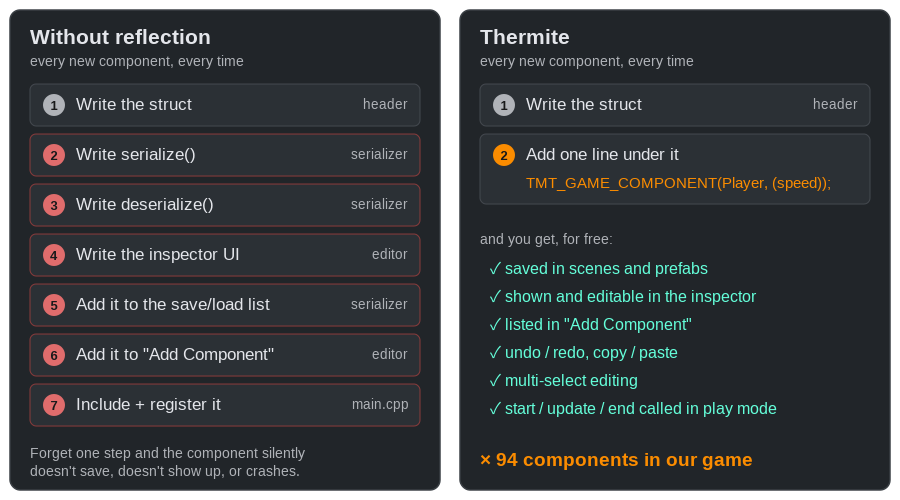 What adding one component costs, without reflection and in Thermite.
On top of that, Thermite had two very different groups writing components:
- Engine programmers writing systems like rendering, physics and animation. They want plain data components and systems that loop over them, the “real” ECS way.
- Gameplay programmers, who just want a simple object with a
start, anupdateand anend, and to get on with the gameplay.
So my goal was simple: make adding and using a component as easy as possible for both groups. No boilerplate, one API for both kinds of components, and clear errors when someone uses it wrong, because 15 other people would be using it.
ECS - OOP vs. DOD
In previous engines I made, I either used an object-oriented programming design (OOP) or a Data-oriented design (DOD) for my entity component system (ECS). Both designs had their pros and cons. In this engine I decided to combine the two and use both.
Engine Components - DOD
For engine side systems (physics, rendering, audio, etc.), performance was critical. For that reason I decided to use a data-oriented design by using the EnTT ECS library. I wrapped EnTT in my own Ecs class, so the rest of the engine and the game never talk to EnTT directly. That wrapper is what later lets engine and game components share one API.
ecs.systems.add<Physics>();
ecs.systems.add<Destruction>();
ecs.systems.add<NavigationSystem>();
ecs.systems.add<UI>();
Engine components are plain structs, and the systems loop over them. For example, the physics system:
for (const auto& [entity, vb, transform] : engine.ecs.view<VoxelBody, Transform>().each()) {
    // ...
}
Game Components - OOP
For gameplay, performance matters less than how quickly you can write something. So gameplay programmers get game components: objects with their own data and their own start, update and end, which the engine calls for them.
The next sections go through both kinds: how you register one, and how it works under the hood.
Engine components
Registering an engine component
C++ has no reflection (yet, until C++26), so you have to tell the compiler which fields a type has. Before Thermite I had already written ImReflect, which generates ImGui inspectors from reflected structs. During the first block of Thermite I wrote its sibling, JsonReflect, which does the same for JSON serialization. Both are built on visit_struct. I wrote about why I picked that library in Reflection, and about how JsonReflect works in One function to serialize them all.
In Thermite, both libraries are hidden behind one engine macro. This is the camera component for example:
namespace tmt {
    struct Camera {
        float fov = 80.0f;
        float pitch = 0.0f;
        float yaw = 90.0f;
        bool active = true;
    };
}

TMT_COMPONENT(tmt::Camera, "Camera", (fov, pitch, yaw, active));
That last line gives the component a display name and reflects the listed fields for both ImGui and JSON. This is what the camera looks like in the inspector, and in a saved scene:
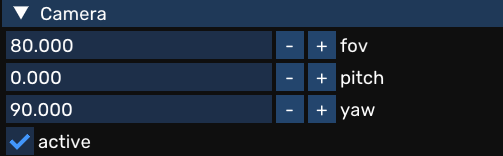 In the inspector
{
    "Camera": {
        "1": {
            "fov": 80,
            "pitch": 0,
            "yaw": 90,
            "active": true
        }
    }
}
In the scene file ("1" is the entity)
Because reflection goes all the way down, nested types and containers just work. A particle emitter holds a list of effects, and each effect uses a small Range type. Each nested type gets a TMT_OBJECT line (reflection without a component name):
namespace tmt {
    struct Range {
        float min;
        float max;
    };

    struct ParticleEffect {
        float particle_lifetime = 1.0f;
        Range start_speed { 1.0f, 1.0f };
        Range start_size { 64.0f, 64.0f };
        // ...
    };

    struct ParticleEmitter {
        std::vector<ParticleEffect> effects;
        bool active = true;
    };
}

TMT_OBJECT(tmt::Range, (min, max));
TMT_OBJECT(tmt::ParticleEffect, (particle_lifetime, start_speed, start_size /* , ... */));
TMT_COMPONENT(tmt::ParticleEmitter, "ParticleEmitter", (effects, active));
The whole list of effects, with every range in it, is saved with the scene and editable in the inspector.
Saving is not the same as showing
Most components save and show the same fields, but not all. The Transform has to save its parent and children, but you never want a designer typing entity IDs into the inspector. So there are separate macros for both lists. It also shows that private members work, using a BEFRIEND_VISITABLE() line in the class:
struct Transform {
    // ... public functions: get_world_position(), set_parent(), ...
   private:
    BEFRIEND_VISITABLE();

    glm::vec3 local_position { 0.0f, 0.0f, 0.0f };
    glm::quat local_rotation { 1.0f, 0.0f, 0.0f, 0.0f };
    glm::vec3 local_scale { 1.0f, 1.0f, 1.0f };

    Entity parent { entt::null };
    std::set<Entity> children;
    // ... cached world matrix, dirty flag
};

TMT_COMPONENT_NAME(tmt::Transform, "Transform");
TMT_COMPONENT_SERIALIZE(tmt::Transform, (local_position, local_rotation, local_scale, parent, children));
TMT_COMPONENT_INSPECT(tmt::Transform, (local_position, local_rotation, local_scale));
This is what that gives you in the editor, without the programmer writing a single line of UI or ImGui code:
Selecting entities and editing the Name, Transform and Camera components. (An early version of the editor, from week 4.)
How the macro works
Under the hood TMT_COMPONENT is not very exciting. It forwards the fields to both libraries and specializes a small Component<T> template for the name:
#define TMT_REFLECTION_IMPL(Type, JsonFields, ImguiFields) \
    JSON_REFLECT(Type, EXPAND JsonFields);                 \
    IMGUI_REFLECT(Type, EXPAND ImguiFields)

#define TMT_COMPONENT_NAME(Type, Name)                           \
    namespace tmt {                                              \
    template <>                                                  \
    struct Component<Type> {                                     \
        static constexpr const char* NAME = Name;                \
        static constexpr const char* get_name() { return NAME; } \
    };                                                           \
    }

#define TMT_COMPONENT(Type, Name, Fields) TMT_COMPONENT_IMPL(Type, Name, Fields, Fields)
Those three things, a name, JSON reflection and ImGui reflection, are what every other part of the engine builds on:
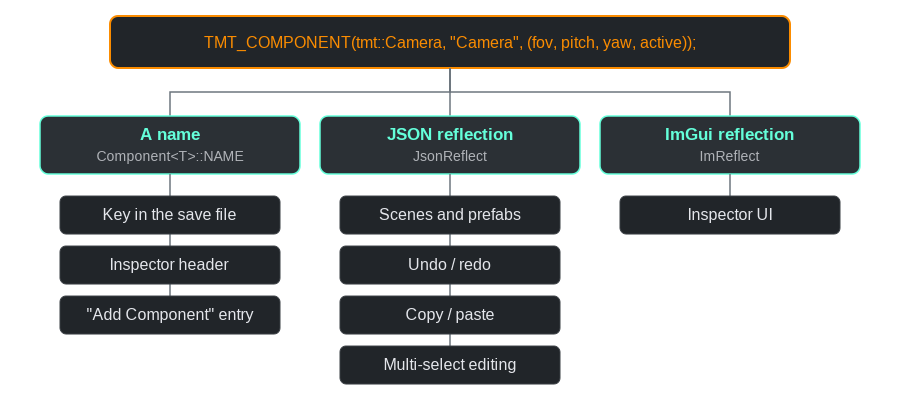
Telling the engine about engine components
Instead of if chains, engine components are listed once, in a type list:
using InspectComponents = ComponentRegistry<
	/* Order in which components are displayed in the editor */
	Name,
	Transform,
	VoxelRenderer,
	Camera,
	Light,
	// ...
>;
ComponentRegistry holds no data. It only exists so I can loop over types at compile time:
template <typename Func, size_t Index = 0>
static void for_each(Func&& func) {
    if constexpr (Index < COUNT) {
        func(type_tag<get<Index>> {});
        /* Recurse to the next index */
        for_each<Func, Index + 1>(std::forward<Func>(func));
    }
}
So every if chain turns into one loop, and inside the loop T is the real type. This is the inspector:
InspectComponents::for_each([&](auto type_tag) {
    using T = typename decltype(type_tag)::type;  // Extract type from tag

    if (tmt::engine.ecs.has_component<T>(entity) == false) return;
    T& component = tmt::engine.ecs.get_component<T>(entity);

    const ImResponse response = ImReflect::Input("", component);
    // ...
});
So for an engine component, that’s all a programmer has to do: write the macro, and add the type to the list. And because it’s just a list of types, I can reuse the same trick anywhere the engine needs to go over every component.
Component dependencies
Some components only make sense together. A Button or Slider always needs a UIInteractable to receive input, like Unity’s [RequireComponent]:
TMT_COMPONENT_DEPENDENCIES(tmt::Button, tmt::UIInteractable);
TMT_COMPONENT_DEPENDENCIES(tmt::Slider, tmt::UIInteractable);
Adding a Button to an entity now adds a UIInteractable too, if it doesn’t have one yet. It uses the same type-list trick. By default, a component has an empty list of dependencies, and the macro specializes that for one type:
template <typename T>
struct ComponentDependencies {
    using Dependencies = ComponentRegistry<>;
};

#define TMT_COMPONENT_DEPENDENCIES(Type, ...)                \
    namespace tmt {                                          \
    template <>                                              \
    struct ComponentDependencies<Type> {                     \
        using Dependencies = ComponentRegistry<__VA_ARGS__>; \
    };                                                       \
    }
add_component then loops over that list and adds every dependency before adding the component itself:
template <typename... Component>
decltype(auto) add_component(Entity entity) {
    constexpr size_t COUNT = sizeof...(Component);
    if constexpr (COUNT == 1) {
        ComponentDependencies<Component...>::Dependencies::for_each([this, entity](auto type_tag) {
            using Dependency = typename decltype(type_tag)::type;
            add_or_get_component<Dependency>(entity);
        });

        return EcsComponentTraits<Component...>::add(registry, entity);
    } else {
        return std::forward_as_tuple(add_component<Component>(entity)...);
    }
}
Game components
A quick recap: engine components are plain data that the engine’s systems loop over. Gameplay programmers get game components instead: objects with their own start, update and end, so they can focus on the gameplay and not on the ECS.
Registering a game component
A gameplay programmer derives from tmt::GameComponent<T>, overrides the events they need, and adds one line. A simplified version of our test player:
class Player : public tmt::GameComponent<Player> {
   public:
    using GameComponent::GameComponent;
    static std::string_view get_name() { return "Player"; }

    void start() override {}
    void update(const tmt::FrameData& time) override;
    void end() override {}

    float camera_sensitivity = 0.1f;
    float acceleration = 10.0f;
    float drag = 2.5f;
    float max_speed = 5.0f;

   private:
    glm::vec3 velocity {};  /* not in the macro: not saved, not shown */
};

TMT_GAME_COMPONENT(Player, (camera_sensitivity, acceleration, drag, max_speed));
void Player::update(const tmt::FrameData& time) {
    velocity += get_move_input() * acceleration * time.delta_time;
    velocity -= velocity * drag * time.delta_time;
    // ... clamp to max_speed, rotate the camera with camera_sensitivity

    auto& transform = tmt::engine.ecs.get_component<tmt::Transform>(entity);
    transform.set_local_position(transform.get_local_position() + velocity * time.delta_time);
}
That’s all. It shows up in “Add Component”, its fields can be edited in the inspector, it’s saved in scenes, and start, update and end get called while the game is playing.
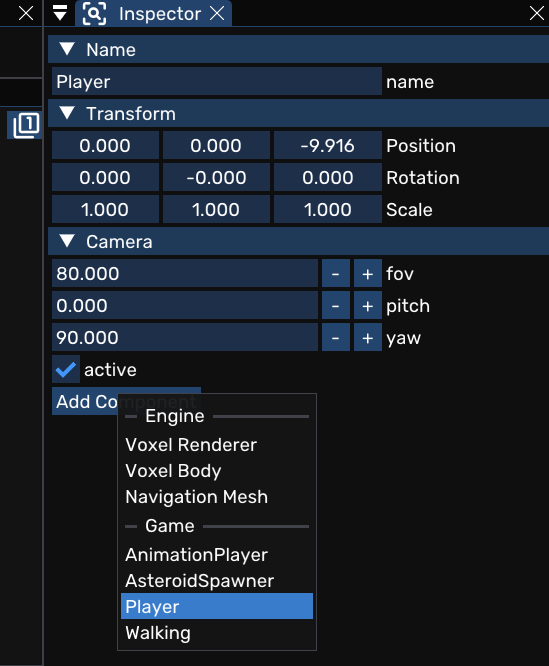 Game components show up in the “Add Component” menu next to the engine ones.
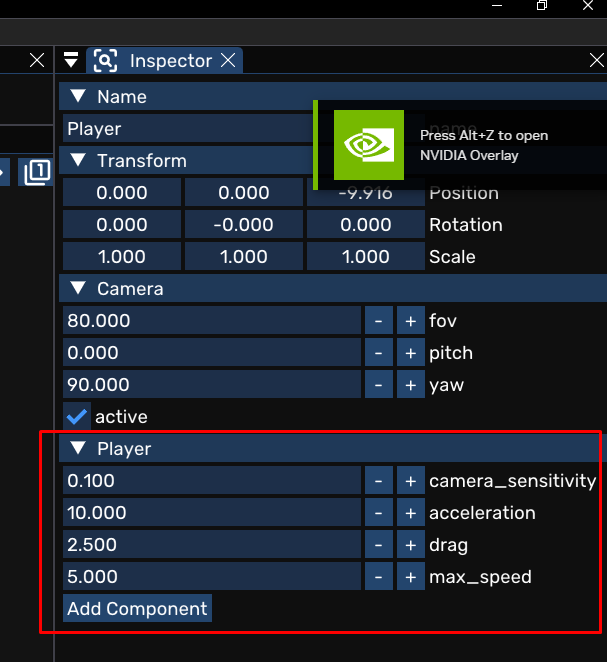 The test
Player component, editable without any UI code.
Auto registration
The engine also needs a list of every game component, for the “Add Component” menu and to create a component from its name when loading a scene. That list is a GameComponentRegistry.
At first, that meant every game component had to be included and registered by hand in the game’s main.cpp. The list kept growing, and it was easy to forget: your component simply wouldn’t show up in the editor. I saw that problem and made components register themselves:
Before:
// player.hpp
TMT_OBJECT(Player, (camera_sensitivity, acceleration, drag, max_speed));

// main.cpp
#include "components/player.hpp"
tmt::engine.component_registry.register_component<Player>();
// ... one of these for every game component
After:
// player.hpp
TMT_GAME_COMPONENT(Player, (camera_sensitivity, acceleration, drag, max_speed));
TMT_GAME_COMPONENT does what TMT_OBJECT did, plus it places a small global static object next to the component, whose constructor registers it:
template <typename T>
struct AutoRegister {
    AutoRegister() { GameComponentRegistry::instance().register_component<T>(); }
};

#define TMT_GAME_COMPONENT_IMPL(Type)                                                                                        \
    namespace {                                                                                                              \
    static_assert(std::is_base_of_v<tmt::IGameComponent, Type>, "AutoRegister<Type>: Type must derive from IGameComponent"); \
    [[maybe_unused]] tmt::details::AutoRegister<Type> TMT_CONCAT(_auto_reg_, __COUNTER__) {};                                \
    }

#define TMT_GAME_COMPONENT(Type, Fields) \
    TMT_GAME_COMPONENT_IMPL(Type)        \
    TMT_OBJECT(Type, Fields)
If you expand the macro under the Player class, it looks roughly like this:
class Player : public tmt::GameComponent<Player> {
    // ...
};

namespace {
    static_assert(std::is_base_of_v<tmt::IGameComponent, Player>, "AutoRegister<Type>: Type must derive from IGameComponent");
    [[maybe_unused]] tmt::details::AutoRegister<Player> _auto_reg_0 {};
}
JSON_REFLECT(Player, camera_sensitivity, acceleration, drag, max_speed);
IMGUI_REFLECT(Player, camera_sensitivity, acceleration, drag, max_speed);
Global static objects are constructed when the program starts, so every game component is registered before main even runs. No list to keep up to date, so nothing to forget.
Why not a type list?
You might wonder why game components need a runtime registry at all, when engine components just use a compile-time type list. That’s because of how the project is built. From the start I set up a clean separation between engine, editor and game: the engine is a static library, the editor is a separate static library that adds ImGui, and the game is the executable that links both. The engine is compiled without knowing the game exists, so it can’t name Player anywhere. And the engine has no ImGui at all, so it couldn’t generate an inspector even if it knew the type.
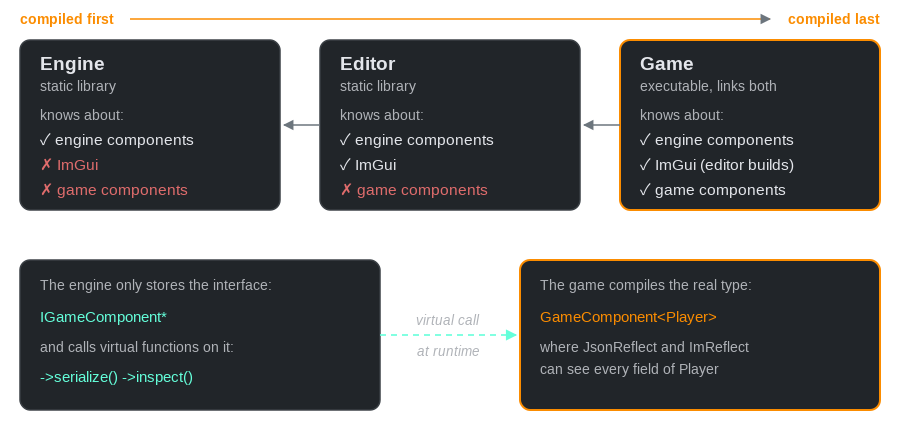
That same separation decides how the engine talks to a game component, and where the code that knows the real type has to live.
How game components work
The engine only knows game components through an interface, IGameComponent. It has the events the user overrides (start, update, end and a few optional ones), and three functions the user never writes or even sees: serialize, deserialize and inspect.
/* Used by engine to call events */
class IGameComponent {
   public:
    IGameComponent(Entity entity) : entity(std::move(entity)) {};
    virtual ~IGameComponent() = default;

    const Entity entity = entt::null;

    /* [ Required ] */
    virtual void start() = 0;
    virtual void update(const FrameData& time) = 0;
    virtual void end() = 0;
    /* [ Optional ] */
    virtual void fixed_update(const FrameData& time) { (void)time; };
    virtual void on_entity_enabled() {};
    virtual void on_entity_disabled() {};
    // ...

    /* [ Auto ] Helpers for engine */
    virtual nlohmann::json serialize(SerializationContext& ctx) const = 0;
    virtual void deserialize(const nlohmann::json& value, SerializationContext& ctx) = 0;
    virtual void inspect(ImSettings& settings, ImResponse& response) = 0;
};
Those three are implemented by the template GameComponent<Derived>, using CRTP (the Curiously Recurring Template Pattern). Remember how the player was declared:
class Player : public tmt::GameComponent<Player> {
Player passes itself as the template argument. So inside GameComponent<Player>, the code knows the real type. And because it’s a template, it’s compiled in the game executable, where Player exists:
template <class Derived>
class GameComponent : public IGameComponent {
   public:
    /* [ Auto ] Implemented by default in-engine so user don't have to */
    nlohmann::json serialize(SerializationContext& ctx) const override {
        // ...
        return Serializer::serialize(static_cast<const Derived&>(*this));
    }

    /* [ Optional ] inspect function to add custom imgui code */
    virtual void on_inspect(ImResponse& response) {};

    void inspect(ImSettings& settings, ImResponse& response) override {
#if defined(THERMITE_EDITOR) && !defined(THERMITE_ENGINE)
        ImReflect::Input("", static_cast<Derived&>(*this), settings, response);
        on_inspect(response);
#endif
    }
};
This is the most important part of the design. From the engine’s and the editor’s side, serialize, deserialize and inspect are just virtual functions: they know nothing about Player, only that it’s an IGameComponent. But behind each of those virtual functions is compile-time reflection on the real type, generated in the game. The engine never needs to know the type: the game component describes itself.
The #if makes sure the ImGui code only exists in the game’s editor build, never in the engine library or in the shipped game. And if a component needs extra editor UI, like a button, it overrides on_inspect and still gets the reflected fields for free.
One API for both
Using components in code
Getting an engine component looks like this:
auto& transform = tmt::engine.ecs.get_component<tmt::Transform>(entity);
And getting a game component is exactly the same call:
auto& player = tmt::engine.ecs.get_component<Player>(entity);
Under the hood the two work completely differently, but for the user it’s one API. The same goes for add_component, has_component, remove_component, try_get_component and view. They’re also variadic, so you can work with several components in one call:
auto [transform, camera] = tmt::engine.ecs.get_component<tmt::Transform, tmt::Camera>(entity);
How it works
Every function in my Ecs wrapper hands the actual work to a traits struct, EcsComponentTraits<T>:
template <typename... Component>
decltype(auto) add_component(Entity entity) {
    if constexpr (sizeof...(Component) == 1) {
        return EcsComponentTraits<Component...>::add(registry, entity);
    } else {
        return std::forward_as_tuple(add_component<Component>(entity)...);
    }
}
(The else with std::forward_as_tuple is only there to support several component types in one call, and the dependency loop from earlier is left out. The gist: every call ends up in EcsComponentTraits<T>.)
For an engine component, the traits forward straight to EnTT:
template <typename T, typename = void>
struct EcsComponentTraits {
    static T& add(Registry& registry, Entity entity) { return registry.emplace<T>(entity); }
    static T& get(Registry& registry, Entity entity) { return registry.get<T>(entity); }
    static bool has(const Registry& registry, Entity entity) { return registry.all_of<T>(entity); }
    // ... remove, try_get, view
};
Game components are polymorphic, so they can’t live in an EnTT pool by value. Instead, each entity with game components gets one native ComponentCollection component that holds them in a map keyed by type. A specialization of the traits, picked with type traits (std::enable_if_t and std::is_base_of_v) for anything derived from IGameComponent, routes every call through that collection:
template <typename T>
struct EcsComponentTraits<T, std::enable_if_t<std::is_base_of_v<IGameComponent, T>>> {
    static T& add(Registry& registry, Entity entity) {
        auto& collection = registry.get_or_emplace<ComponentCollection>(entity);
        return collection.add_component<T>(entity);
    }
    static T& get(Registry& registry, Entity entity) {
        auto& collection = registry.get_or_emplace<ComponentCollection>(entity);
        return collection.get_component<T>();
    }
    // ... has, remove, try_get, view
};
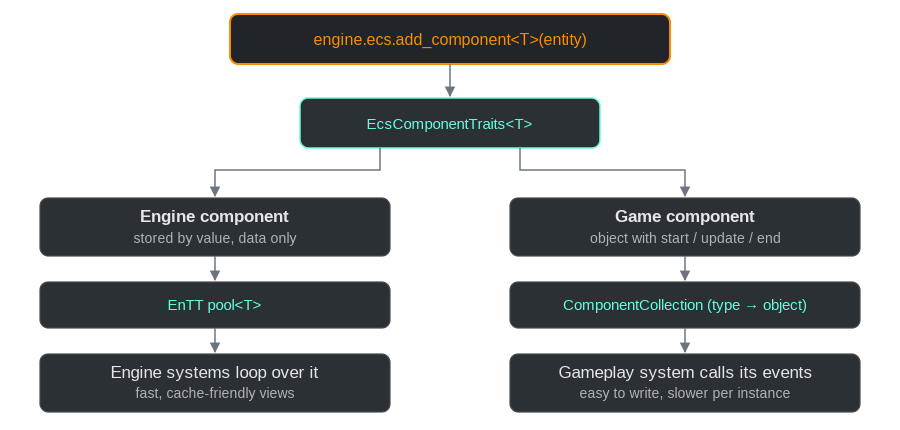
Views over game components work too. They return elements you can use with structured bindings, just like an EnTT view. The one thing you can’t do is mix the two kinds in one view, and the compiler tells you so (more on that below).
How I use it
Once every component has a name and reflected fields, a lot of engine and editor features become “loop over the components and inspect or serialize them”. None of them have any per-component code: if a component works in the inspector, it works with all of the below.
Scene serialization
Saving uses another type list, SerializeComponents. Components are saved in the order of the list, so changing the order is just moving a line:
using SerializeComponents = ComponentRegistry<
	/* Order in which components are serialized */
	Name,
	Transform,
	VoxelRenderer,
	Camera,
	Light,
	// ...
>;
Saving a scene is one loop over that list, with every component stored under its name. Simplified:
SerializeComponents::for_each([&](auto type_tag) {
    using T = typename decltype(type_tag)::type;
    const char* name = tmt::Component<T>::get_name();

    for (auto&& [entity, component] : ecs.view<T>().each()) {
        scene_json[name][to_string(entity)] = tmt::Serializer::serialize(component);
    }
});
Which gives a scene file like this (simplified):
{
    "Name": {
        "0": { "name": "Player" },
        "1": { "name": "Enemy" }
    },
    "Transform": {
        "0": { "local_position": { "x": 0, "y": 1, "z": 0 } },
        "1": { "local_position": { "x": 5, "y": 0, "z": 2 } }
    }
}
Loading does the same loop in the same order, the other way around.
Quality of life
Now that every component can be inspected and serialized in the same generic, consistent way, I could add a lot of quality-of-life features to the editor without writing them per component.
Undo/redo and multi-select editing
These are two separate features, built on the same idea: turn a component into JSON before and after an edit.
- Undo/redo: the “before” and “after” JSON are stored as one undo step. Undo loads the “before”, redo loads the “after”. ImReflect tells me when a widget is first grabbed and when it’s released, so dragging a slider gives one undo step, not one per frame.
- Multi-select editing: when several entities are selected, I take the JSON diff between “before” and “after” and apply only that patch to the other selected entities. So changing the X position of ten objects doesn’t also snap their Y and Z to the same value.
auto after = tmt::Serializer::serialize(component_instance);
const json diff = nlohmann::json::diff(before, after);

for (const Entity& entity : selected_entities) {
    // ...
    json other_json = tmt::Serializer::serialize(other_instance);
    other_json.patch_inplace(diff);
    tmt::Serializer::deserialize(other_json, other_instance);
}
Editing several entities at once, then undoing and redoing those edits.
Copy/paste
Copying a component puts { component_type, data } JSON on the clipboard, pasting reads it back onto another entity.
Copying and pasting components between entities.
“I used to read error messages, now I write them”
For most of my programming life, error messages were something I read: a compiler error, a crash in the console, and I figure out what went wrong. In Thermite I was on the other side. Fifteen people were using code I wrote, and every unclear error turned into someone walking up to my desk, or worse, someone losing time quietly. So I started treating error messages as part of the API.
Template code is famous for errors that are hundreds of lines long. So wherever someone could use the system wrong, I added a static_assert that says what’s wrong in plain English:
static_assert(ALL_NATIVE || ALL_GAME, "Cannot mix native ECS components and IGameComponent-derived types in a single view.");
static_assert(std::is_base_of_v<tmt::IGameComponent, Type>, "AutoRegister<Type>: Type must derive from IGameComponent");
My reflection libraries do the same. If a field’s type can’t be saved or shown, you get one clear line instead of a wall of template errors:
static_assert(svh::always_false<T>::value, "JsonSerializer Error: No suitable serialize implementation found for type T");
static_assert(svh::always_false<T>::value, "ImReflect Error: No suitable Input implementation found for type T");
The always_false<T> is there on purpose. A plain static_assert(false, ...) in a discarded if constexpr branch fails to compile even when that branch is never used (until C++23). Making the condition depend on T delays the check until the template is actually instantiated with a bad type. I ran into that one during the project.
Where possible I went one step further and used a C++20 concept instead. The error is the same, but the IDE now shows it while typing, before you even compile. This is how registering a system looked in the first block:
template <typename T>
concept System = std::is_base_of_v<ISystem, T>;

template <System T, typename... Args>
T& register_system(Args&&... args);
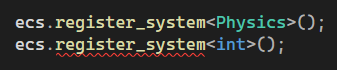
register_system<int>() is underlined right away.
How the team used it
In the end, Thermite had 37 engine components and Starlocked 57 game components, and not a single programmer had to write serialization or ImGui code for any of them. That saved a lot of time, and made iterating on gameplay a lot faster. The team was very happy with the reflection system: it was easy to use, and it just worked.
Trade-offs and what I’d do differently
Compile times. This was the big one. Everything is compile-time: the reflection, the type lists, the CRTP. And the macros live in the headers, next to the components. So every file that includes a component header also instantiates all of its JsonReflect and ImReflect code again. With 94 components, by the end of the project compile times got quite extreme. Looking back, I think moving the macro expansions out of the headers and into .cpp files (declare in the header, generate the code once in a .cpp) would have fixed most of it. That’s the first thing I’d look at next time.
Game components are slower than engine components, on purpose. They’re heap-allocated, found through a map lookup and called through a virtual function. That was a conscious trade-off from the start: hot code goes into engine components and systems, gameplay logic into game components. It was never a problem in Starlocked.
The display name is the save key. Renaming a component breaks old scenes (with a clear warning, at least). A stable ID per component would have been better.
Owning the templates. Macros and templated C++ make the system easy to use, but the internals are complex. Whenever an edge case didn’t work or a feature was missing, adding or fixing it was on me. That’s part of owning a core system, but it’s worth planning time for: the more people use it, the more of your time goes to supporting it.
Lessons learned
- Iteration speed is a feature. The real goal was never “reflection”. It was that a gameplay programmer can go from idea to testing it in the editor in a few minutes. That’s what I care about most as an engine and tools programmer.
- Make the right thing the easy thing. The manual registration list worked, but people forgot it. The macro can’t be forgotten, because it’s the same line that makes the component show up at all. Every manual step you remove is a bug report you’ll never get.
- Give each audience its own model, but one API. Engine programmers got data and systems, gameplay programmers got objects with events, and both use
engine.ecs.add_component<T>(). - One source of truth. The reflection line is the only place that describes a component’s fields. Saving, the inspector, undo/redo, copy/paste and multi-select editing are all built on it, so they can never get out of sync with the struct.
- Error messages are part of the API. The more people use your code, the more an error message is worth. A good
static_assertsaves someone an hour, and saves you an interruption. - Watch your compile times early. Header-only compile-time magic is great to use, but it adds up. Measure it before it gets painful, not after.
Try the editor yourself
I’m responsible for most of the Thermite editor, including the hierarchy and inspector windows you’ve seen in this post. As a toy project after the course, I got the editor running in the browser (WebAssembly + WebGPU), with the help of an AI assistant. It’s not how we shipped Thermite and it doesn’t work 100% correctly, but it’s a nice, interactive way to click around: select an entity in the hierarchy and change its components in the inspector.
Desktop Chrome or Edge (it needs WebGPU), about 55 MB to download. In the viewport, hold the right mouse button and use WASD to fly. Or open it in a new tab.